




















How to Add an Embedded Donation Form to Your Website (Without Sending Donors Away)
donation formconversion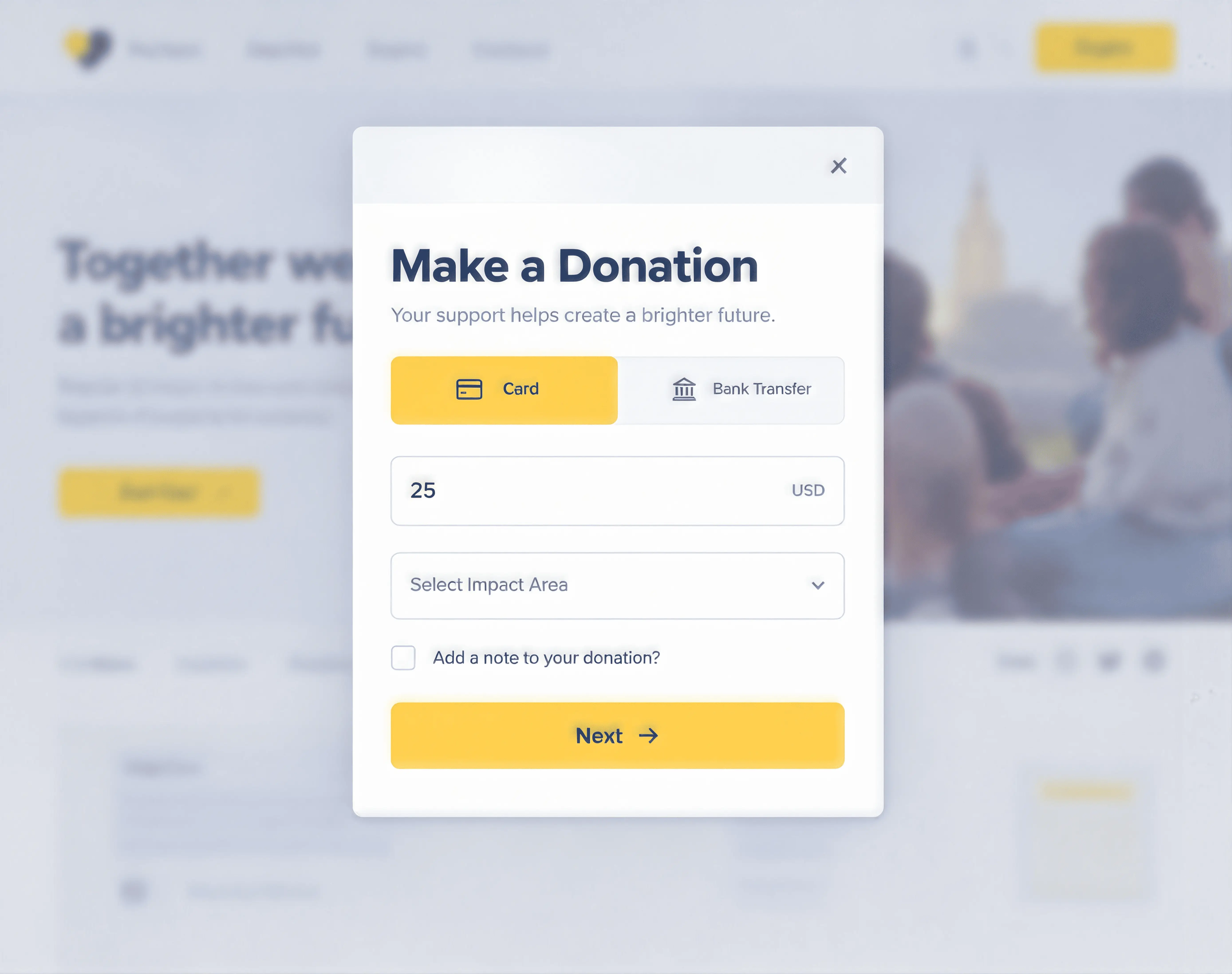
An embedded donation form sits directly on your website, so donors give without ever leaving your page. Orthoplex began with a website. In 2015, our three founders volunteered to build one for their church, and over the next decade we built many more for charities, food banks, and community programs. So when it comes to donation pages, we have seen what works, and what quietly loses gifts. One of the simplest improvements is an embedded donation form.
The biggest lesson: keep donors on your website.
How do you add a donation page to your website?
There are four common ways. You can link to a hosted donation page, embed a form on your own page with a snippet of code (often an iframe), add a donate button that opens the form in a popup, or use a plugin or shortcode if your site runs on WordPress. Embedding keeps donors on your site and in your brand, which is why we focus on it here. You can also share the same form with a QR code for print and events.
Embedded donation form vs. redirected form
A redirected form sends donors from your site to a page hosted by the software company. The design changes, the web address changes, and some donors hesitate or leave. Others worry they have landed somewhere they did not intend.
An embedded donation form sits directly on your own page. The donor never leaves your site, the experience matches your brand, and there is one less reason to stop.
We cover more of the reasons donors abandon checkout in your donation form is leaking gifts.
What a good donation form includes
- Suggested amounts with a custom option. Three or four suggestions are enough.
- One-time and recurring choices, with monthly clearly offered.
- A fund or campaign selector, if you run more than one, so every gift is tagged to the right fund.
- Multiple payment methods, such as cards, digital wallets, and bank payments.
- An optional "cover the fees" checkbox.
- A short line on impact, such as what a gift of a certain amount provides.
- A clear confirmation, with a receipt sent right away.
What to leave out
- Tip prompts for the software company. They confuse donors. We explain why in what "free" donation platforms really cost.
- Unnecessary fields. Only ask for what you need to process the gift and issue a receipt.
- Account creation before giving. Let donors give first.
- Slow pages. Heavy images and scripts cost gifts on mobile.
- Distractions. Remove menus and links that pull donors away mid-checkout.
Make it accessible
Some of your donors use screen readers, keyboard navigation, or larger text. Clear labels, good contrast, and visible error messages help everyone. The W3C's WCAG overview is the standard reference for web accessibility.
Where to place your form
- A dedicated donate page, linked from a clear button in your site header
- Campaign pages, with the form set to that campaign's fund
- Your home page, for organizations where giving is the main action
- Program pages, where visitors are already reading about impact
How to add a form to your website
- Step 1: Choose your platform. Your donation form should connect directly to your donor records, so every gift updates the donor's history and triggers a receipt.
- Step 2: Configure the form. Set amounts, funds, payment methods, and colours to match your brand.
- Step 3: Embed it. Most platforms give you a short snippet of code or a button to add to your site. On WordPress, this usually goes into a custom HTML block or your page builder's HTML widget.
- Step 4: Test on mobile. Make a real donation on your phone. If anything is confusing, fix it.
- Step 5: Put it everywhere. Add a clear "Donate" button in your site header, on key pages, and in your emails.
How to add a donation form to WordPress, Wix or Squarespace
The steps are similar on every site builder. Copy the embed code or button snippet from your donation platform, add an HTML or embed block to the page, paste the code, publish, and test with a small real gift. On WordPress, use a Custom HTML block or your page builder's HTML widget, or a shortcode if your platform provides one. On Wix and Squarespace, use their embed or code block. No developer is needed for most small sites, though your site builder's plan may limit custom code, so check its help pages.
A quick mobile checklist
Most donors will see your form on a phone. Check that:
- Buttons are large enough to tap easily
- Suggested amounts fit on one screen without scrolling sideways
- Digital wallets, such as Apple Pay or Google Pay, are offered where your processor supports them
- Error messages are clear and appear next to the field that needs fixing
- The confirmation screen tells donors a receipt is on its way
Measure and improve your form
A donation form is never finished. Check these numbers every few months:
- Completion rate: how many people who start the form finish it
- Mobile vs. desktop: whether mobile donors complete at a similar rate
- Average gift: whether your suggested amounts are helping or holding gifts back
- Monthly share: what percentage of donors choose to give monthly
Change one thing at a time, such as the suggested amounts or the impact line, and compare the results over a few weeks.
A real example: live in under an hour
We recently built the website for AIMS (Archangel Michael Initiative for Mental Health Support), a program that facilitates access to faith-based mental health services by combining professional psychotherapy with spiritual care and community support. Their donation page connects each gift to a clear outcome, which is exactly the kind of impact line we recommend.
We embedded and deployed their DonorsBase donation forms on the new site in less than an hour. That is what embedding should feel like: configure the form, paste it in, test it, and start accepting gifts the same day.
How do you receive donations on your website?
You need three things: a donation form on your site, a payment processor to move the money, and a donor record to log each gift and send the receipt. DonorsBase donation forms connect to Stripe, PayPal and Authorize.net, so each gift creates or updates the donor profile and triggers a receipt automatically. Whatever platform you choose, confirm how it handles receipts, recurring gifts and fees before you launch.
Take your form offline with a QR code
Your donation form should not only live on your website. Almost every organization we have worked with asked us, at some point, for a QR code for a specific form: a campaign poster, a gala table card, a Sunday bulletin, a food drive flyer.
We heard it so often that DonorsBase now generates a QR code automatically for every donation form and every event. Download it, print it, and donors can scan and give from their phones, with the gift going straight to the right fund.
How DonorsBase donation forms work
The DonorsBase donation experience embeds directly on your website with no iframes or redirects. You set custom amounts, choose payment methods, let donors cover processing fees, and match your brand colours, with no coding required. Donors can give one-time or recurring, and they are never asked to tip DonorsBase.
Payments go through your own Stripe, PayPal, or Authorize.net account, so you keep your own rates. Every gift lands in the donor's record and triggers a receipt automatically.
For payment options that go beyond cards, Stripe's pricing page lists the methods it supports in different countries.
Want help setting up your form? Book a demo, and our team will walk you through it.
Frequently asked questions
What is an embedded donation form?
A donation form that sits directly on your website, so donors complete their gift without leaving your page.
Can I add a donation form to WordPress?
Yes. Most platforms provide an embed code, button or shortcode that you add with an HTML block or page builder widget. The same approach works on Wix and Squarespace using their embed or code blocks.
How long does it take to add a donation form?
With the right platform, under an hour. We embedded and launched AIMS's DonorsBase forms in less than an hour.
Should donation forms offer monthly giving?
Yes. Offering a clear monthly option is one of the easiest ways to grow recurring revenue.
How do I add a donation form to my website for free?
Some platforms offer free plans, but free often means transaction fees or tips added to each gift. Compare the total cost, and see our post on free donation platforms.
What is the easiest way to accept donations on a website?
Embed a donation form or a donate button from a platform that connects to your donor records, so receipts and reporting happen automatically.